
Production Onboarding
Follow these steps as soon as you have a merchant ready for onboarding to Production. Each merchant is activated separately.
Onboarding steps
Three steps, then the Start Receipt.
Create a production account
Create a production account on Viva.com for the merchant.
Activate Viva Fiscal
Activate Viva Fiscal from the merchant's self-care portal:
- Go to vivapayments.com/selfcare/el/integrations/vivafiscal, or open the menu Ενσωματώσεις → Viva Fiscal.
- Click Enable.
- Complete the form. It asks for the merchant's internet provider (ISP), the contract number and date, and the planned start date for e-invoicing. These are required under clause 3.11 of the terms of use, which obliges the merchant to declare an alternative internet connection.
- Tick the terms of use checkbox, then click Αίτηση ενεργοποίησης.
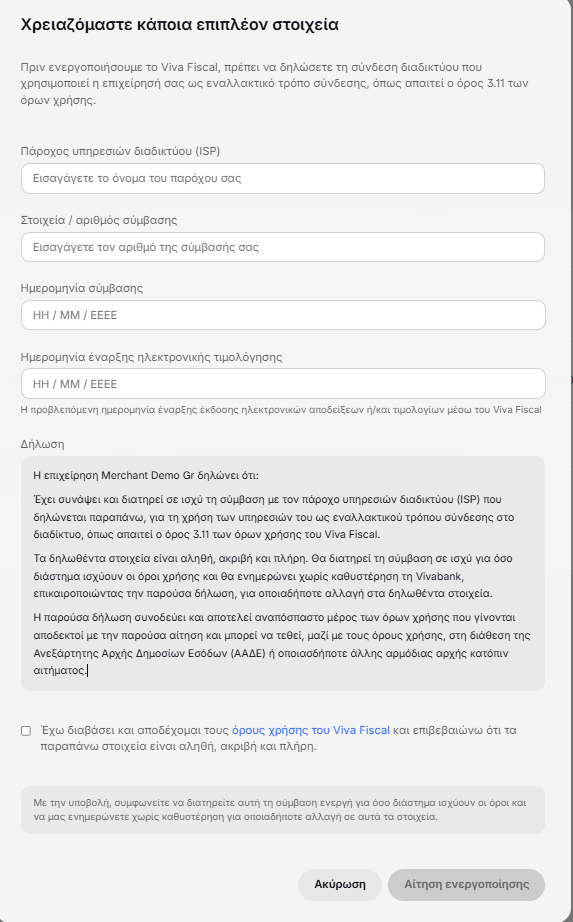
Note: the form covers the activation request only. Branches cannot be declared here, see step 3.
Set up branches
Branches are set up separately, because the self-care form does not handle them. Contact your ISV Manager and provide the entity's VAT number, plus the following for each branch:
- Branch name
- Address
- VAT number
- Terminal IDs that will be associated with it
Send the Start Receipt
When the activation is completed, send the Start Receipt once for the merchant. See Start Receipt for what it is and how to send it.
Selling online? See Fiscalisation for card-not-present Sales for the receipts:sign API and its scenarios.