
Cloud Terminal API
Viva's EFT POS solution allows for REST API connections between EFT POS (card terminal) devices and ECR systems, even across different networks and locations.
Overview
Our EFT POS (Electronic Funds Transfer - Point of Sale) solution utilises REST APIs to allow EFT POS devices and ECR systems to initiate transactions and exchange data. Compared to a traditional TCP/IP-based setup, EFT POS has the benefit of devices not needing to be in the same physical location or on the same local network. All requests and responses from the ECR to EFT POS and vice versa are handled by the REST API service.
Supported Devices
Viva’s REST API (EFT POS) functionality is supported by:
- Android devices (including Tap-on-Phone, Viva Contactless Terminal powered by Google Play, Viva Contactless Terminal with Professional Scanner powered by Google Play & Viva Contactless / Chip & PIN Terminal powered by Google Play, Viva-approved PCI-PTS certified Android payment terminals including Sunmi P2 SE, Sunmi P2 LITE SE, Sunmi P2 SmartPad, Sunmi P2 Mini Standard, SUNMI P3, ELO M60, Ciontek CS50 )
- iOS devices - including support for Apple Tap to Pay Austria, Belgium, Bulgaria, Croatia, Cyprus, Czech Republic, Denmark, Finland, France, Germany, Greece, Hungary, Ireland, Italy, Luxembourg, Malta, Poland, Portugal, Romania, Spain, Sweden, the Netherlands, Norway, the UK
- Paydroid devices: A920 Pro, A35, A80, A77, A8900 (devices with Android 10 or later)
Process Flow
The below diagram outlines the relationship and process flow between the systems involved in an EFT POS communication:
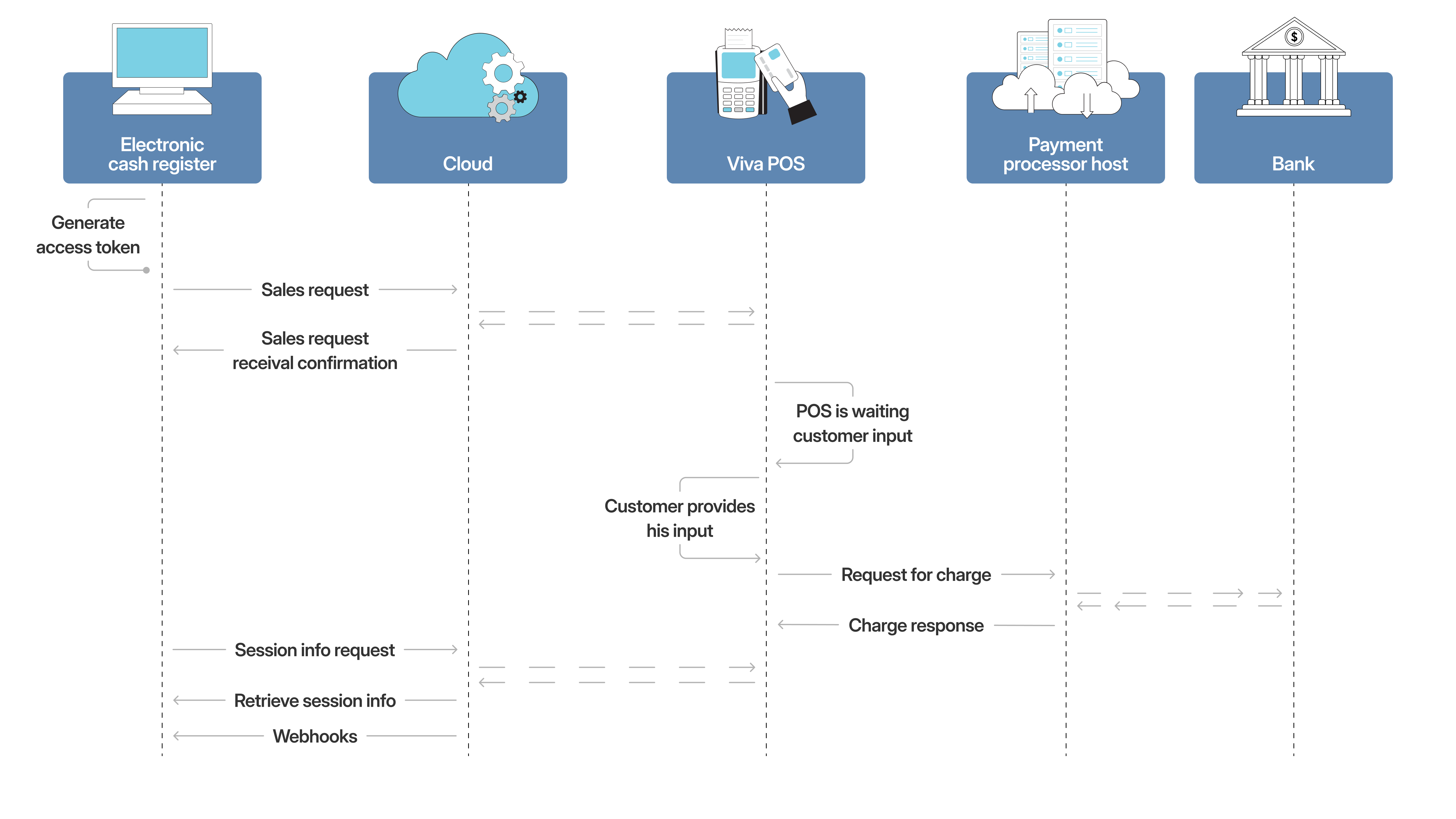
The steps of the above process flow are explained below:
-
For WAN connections to the REST API, where an ECR needs to discover which EFT POS devices are available
before starting an operation, a
service endpoint is provided
to query and retrieve a list of EFT POS devices that belong to a merchant (optionally filtered).
-
The ECR sends a Sales Request to the EFT POS, via the REST API service, using either the merchant endpoint
Sales Request
or the ISV endpoint
Sales Request (ISV)
.
-
The REST API service forwards the ECR request to the EFT POS device using a message delivery mechanism.
-
The EFT POS receives the relayed instruction from the REST API service and carries out the requested operation.
-
Once the EFT POS operation is completed, the EFT POS relays the response data back to the REST API service,
which makes it available for the ECR to retrieve.
-
During the above process, the ECR enters a polling state, where regular polling requests are made to the REST API
service to enquire about the outcome of the original request. Each original request is identified by an
ECR-generated
sessionId. The ECR retrieves the session result using either the session retrieval endpoint for [merchants](/apis-for-point-of-sale/card-terminals-devices/rest-api/eft-pos-api-documentation/#tag/Sessions/paths/~1ecr~1v1~1sessions~1{sessionId}/get) or ISV partners. Once the EFT POS response is relayed back to the REST API service, the next poll returns the full response.
- As an alternative to polling, a webhook mechanism can be set up whereby, once the EFT POS response data is relayed back to the REST API service, the REST API service can push the response to a pre-configured ECR endpoint without the ECR remaining in a polling state. To listen to a successful response, configure the Transaction POS ECR Session Created webhook; to listen to a failure result, configure the Transaction POS ECR Session Failed.
API Documentation
Please see our Cloud Terminal API Documentation, which covers the following API calls:
- Obtain a Bearer Token
- Search Merchant Devices
- Initiate a Sales Request
- Refund a Transaction
- Retrieve Session Info
- Retrieve Session Info by Date
- Abort Session
Get Support
If you would like to integrate with Viva, or if you have any queries about our products and solutions, please see our Contact & Support page to see how we can help!